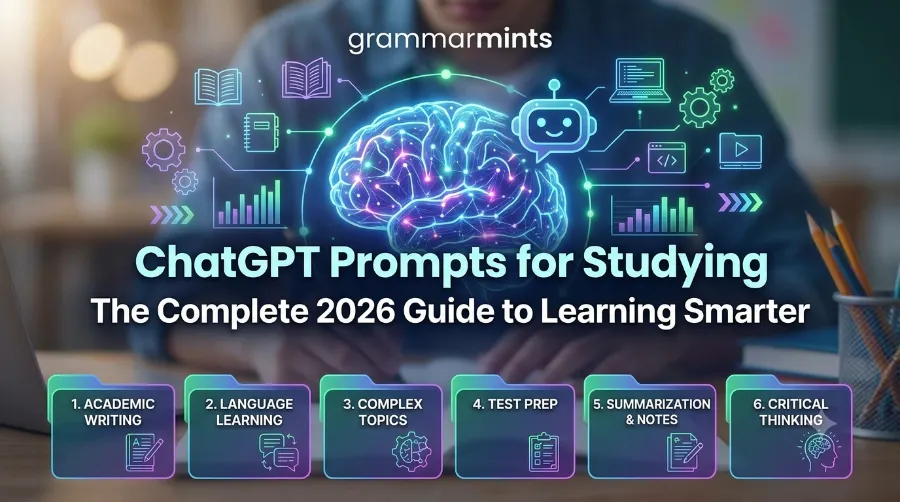
Late nights, three assignments due at once, and a textbook chapter you have not even opened yet — sound familiar? That is exactly why so many students now turn to ChatGPT prompts for studying instead of another all-nighter. Used the right way, these prompts turn a chatbot into a patient tutor who explains, quizzes, and organizes without ever getting tired. This guide walks you through what these prompts are, why they work, and how to write your own so you can study smarter, not longer.
If you want to learn more about Grammarly vs ChatGPT comparison for practical tips and expert advice.
What Are ChatGPT Prompts for Studying?
A ChatGPT prompt is simply the instruction you type to tell the AI what you want. When that instruction is built for schoolwork — summarizing a chapter, building a quiz, or explaining a formula — it becomes one of the many ChatGPT prompts for studying that learners use every day. Think of it as a recipe: the clearer the ingredients, the better the result.
For example, instead of typing “help me with biology,” a stronger prompt might read: “Act as a biology tutor. Explain mitosis in five simple steps, then quiz me with three short questions.” Because the request includes a role, a task, and a format, ChatGPT responds with something you can actually use for review.
If you want to learn more about ChatGPT prompts for studying for practical tips and expert advice
Consequently, the skill of writing these prompts matters more than the tool itself. Two students with the same ChatGPT subscription can get very different results depending on how they phrase their requests. That is why prompt quality, not prompt quantity, decides whether AI becomes a real study partner.
If you want to learn more about best study techniques for students tips and expert advice.
Some students collect prompt libraries with hundreds of ready-made templates, sorted by subject or task type. Others prefer writing prompts from scratch each time, adjusting the wording as they go. Neither approach is wrong; however, beginners generally find it easier to start with templates and gradually learn what makes a prompt work before customizing their own.
If you want to learn more about best note taking methods for students tips and expert advice.
It also helps to remember that ChatGPT has no memory of your class unless you tell it. Consequently, feeding it your actual syllabus, notes, or textbook excerpt almost always produces a more accurate and relevant response than asking about a topic in the abstract.
If you want to learn more about best Pomodoro technique for students tips and expert advice.
Why Students Are Turning to ChatGPT Prompts for Studying in 2026
AI use in classrooms has grown fast, and the numbers back that up. Pew Research found that 26% of teens aged 13–17 used ChatGPT for school assignments in 2024, which was double the share from just one year earlier. Meanwhile, OpenAI rolled out a dedicated Study Mode in July 2025, and it has since remained available across Free, Plus, and Pro plans.
Furthermore, surveys from 2026 suggest more than half of college students now use some form of AI while studying, whether for note cleanup, quiz generation, or essay outlining. However, reliability still varies widely between subjects, so students who verify facts get far better outcomes than those who copy answers blindly.
Part of this growth also traces back to accessibility. Because ChatGPT is free to start using and works on any device with a browser, it removes the cost barrier that once limited access to private tutoring. For many students juggling part-time jobs alongside coursework, a well-written prompt can substitute for an hour they simply do not have to spend with a paid tutor, even if it cannot fully replace one.
The table below summarizes the trend so you can see the shift at a glance.
| Year | Student AI Usage Signal | Source |
|---|---|---|
| 2023 | 13% of teens used ChatGPT for schoolwork | Pew Research (cited via MyTutor) |
| 2024 | 26% of teens used ChatGPT for schoolwork, doubling in one year | Pew Research (cited via MyTutor) |
| 2025 | ChatGPT Study Mode launched in July, available on all plans | OpenAI |
| 2026 | Over half of surveyed college students report using AI for studying in some form | Coursiv, 2026 |
Because this growth is not slowing down, learning to prompt well is quickly becoming as important as learning to search the web once was.
Real-Life Examples: ChatGPT Prompts for Studying in Action
Numbers are useful, but real classroom stories make the shift easier to picture. In one 2026 case documented by researchers writing in Teaching Statistics, a business school instructor used ChatGPT prompt templates to generate fresh accounting and statistics problems for every new semester, cutting assessment prep time significantly while keeping questions original enough to reduce copying between classes.
Similarly, a widely cited Fastweb guide from mid-2026 walks through a student using a single prompt, “Summarize this chapter in key bullet points,” to condense a 30-page reading into a one-page review sheet before an exam. That kind of compression is exactly why so many students now build ChatGPT prompts for studying into their weekly routine instead of treating AI as a last-minute panic button.
Meanwhile, OpenAI’s own Study Mode rollout in July 2025 was built around a similar idea at scale: instead of handing back a finished answer, the system now walks students through guided questioning first. Early feedback shared by OpenAI noted that students using Study Mode reported feeling more prepared for tests because they had to reason through the material themselves, rather than simply reading a completed explanation.
These examples share a common thread. In each case, the AI did not replace the studying itself; it removed friction from getting started, whether that meant creating a fresh quiz, condensing a chapter, or asking better questions along the way.
How to Write Effective ChatGPT Prompts for Studying
Good prompts follow a pattern, and once you learn it, you can reuse it for almost any subject. Below are the building blocks that consistently produce better answers.
Use the Role, Task, Context, Format Method
First, give ChatGPT a role, such as “act as a chemistry tutor.” Next, state the task clearly, like “explain the difference between ionic and covalent bonds.” Then add context, for instance your grade level or the textbook chapter. Finally, request a format, such as a bullet list, table, or short quiz. This four-part structure removes guesswork and keeps the AI focused on what you actually need.
Be Specific About Subject and Skill Level
Vague prompts produce vague answers. Telling ChatGPT you are a high school sophomore preparing for an AP exam, rather than just “a student,” helps it calibrate difficulty and vocabulary correctly. As a result, explanations feel neither too basic nor too advanced.
Ask It to Teach, Not Just Answer
Prompts that ask ChatGPT to explain, quiz, or challenge you tend to build real understanding, while prompts that simply request finished answers skip the learning step entirely. Therefore, framing requests around practice and explanation, rather than final output, tends to help retention far more.
A few habits make prompts even sharper:
- Add your actual notes or textbook text instead of a vague topic name.
- Ask for a specific number of questions, steps, or bullet points.
- Request follow-up questions so the AI checks your understanding.
- Tell ChatGPT what NOT to do, such as “don’t give me the answer yet.”
15 Ready-to-Use ChatGPT Prompts for Studying
Below is a categorized starter set. Copy any of these, swap in your subject, and adjust the details to match your course.
Prompts for Note-Taking
Messy notes are one of the biggest reasons review sessions drag on. Instead of retyping everything by hand, paste your raw notes directly into ChatGPT and let it do the sorting. This works especially well right after class, while the material is still fresh and easy to check for accuracy.
- “Clean up these lecture notes and organize them under clear headings: [paste notes].”
- “Summarize this chapter in eight bullet points, keeping only the main ideas.”
- “Turn my rough notes into a one-page study guide with key terms bolded.”
Prompts for Exam Prep
Exam season rewards structure over cramming. These prompts push ChatGPT to act less like a search engine and more like a practice partner, quizzing you repeatedly instead of just listing facts once. Requesting the answer key separately, as shown below, also stops you from peeking too early.
- “Create a 10-question multiple-choice quiz on [topic], then give me the answer key separately.”
- “Give me a 5-day review schedule for my [subject] final, with daily time blocks.”
- “Ask me exam-style questions on [topic] one at a time, and tell me what I got wrong after each answer.”
Prompts for Essay Writing
Writer’s block often comes from staring at a blank page rather than from lacking ideas. These prompts are designed to get words moving, whether that means shaping a thesis, tightening a paragraph, or laying out a clear structure before you start drafting in your own voice.
- “Suggest five original thesis statement options for an argumentative essay on [topic].”
- “Review this paragraph for clarity and flow, and explain each suggested change: [paste paragraph].”
- “Help me build an outline with an introduction, three body sections, and a conclusion for [topic].”
Prompts for Concept Explanation
The Feynman Technique, where you explain a topic as if teaching a total beginner, works especially well with AI because ChatGPT can play the role of the confused student and push back with follow-up questions. This forces you to fill in gaps you did not realize you had.
- “Explain [concept] in simple terms, then explain it again as if I were twelve years old.”
- “Compare and contrast [concept A] and [concept B] in a short table.”
- “Act as a classmate who knows nothing about [topic]. Ask me questions so I can teach you the concept.”
Prompts for Productivity and Focus
Studying smarter is not only about content; it is also about time. These prompts turn ChatGPT into a scheduling assistant that can sort priorities, build focus blocks, and account for the rest of your life outside the classroom.
- “Prioritize this to-do list using the Eisenhower Matrix: [paste list].”
- “Build a Pomodoro schedule for a three-hour study session with short breaks.”
- “Help me plan realistic study time around my part-time job and classes this week.”
For an even deeper library of copy-paste options, MyTutor’s guide to ChatGPT prompts for students offers a useful framework built around learning without shortcutting the work. Alchemy Works also maintains a broader prompt collection worth bookmarking for subjects beyond the basics covered here.
ChatGPT Prompts for Studying by Subject
General prompt templates are a strong starting point, but tweaking them for your specific subject usually produces sharper, more usable answers. Different fields reward different prompt structures: math wants step-by-step reasoning, history wants comparison and context, and languages want live back-and-forth practice. Below are subject-specific adjustments worth trying, and each one can be combined with the Role, Task, Context, Format method covered earlier in this guide.
Math and Statistics
Math benefits from step-by-step prompts rather than answer-only ones. Try: “Don’t solve this yet. First, identify what the problem is asking, list the given information, and set up the equation. Let me solve it from there.” This keeps you doing the actual calculation, which is where real skill-building happens. Because ChatGPT can occasionally make arithmetic slips, always double-check final numbers by hand or with a calculator.
Science
For science-heavy courses, diagrams and step sequences matter as much as definitions. A prompt like “Explain the stages of cellular respiration in order, then quiz me on the order afterward” builds both understanding and recall in a single exchange. Lab-based courses can also benefit from asking ChatGPT to explain the reasoning behind a procedure, not just the steps themselves.
History and Social Studies
History rewards context and comparison. Try: “Compare the causes of [event A] and [event B] in a short table, then ask me which factors overlap.” This format naturally builds toward essay-style thinking, which is usually how history is assessed.
Foreign Languages
Language learners can use ChatGPT as a low-pressure conversation partner. A prompt such as “Have a simple conversation with me in French about ordering food, correcting my grammar after each response” combines practice with instant feedback, something a textbook alone cannot offer.
ChatGPT Study Mode vs. Regular Prompts
Since mid-2025, OpenAI has offered a built-in Study Mode designed specifically for learning rather than quick answers. Instead of handing over a finished solution, Study Mode asks guiding questions and breaks information into smaller steps, much like a tutor would. According to OpenAI’s own announcement, this mode combines Socratic questioning, scaffolded responses, and personalization based on your skill level.
That said, regular prompts still have a place, especially when you already know the structure you want and just need it executed quickly. Study Mode tends to shine on genuinely new or difficult material, while a plain, well-structured prompt often wins when you already understand a topic and just need it formatted into a quiz, outline, or summary. The comparison below shows when each approach fits best.
| Feature | Regular ChatGPT Prompts | ChatGPT Study Mode |
|---|---|---|
| Best for | Quick, specific tasks like quizzes or summaries | Deep understanding and step-by-step learning |
| Response style | Direct answers based on your instructions | Guiding questions before answers |
| Control | You control structure fully | AI guides the pace and structure |
| Ideal use case | Building a study guide fast | Working through a hard concept slowly |
Choosing between the two often comes down to how much time you have and whether you need speed or depth. Many students, in practice, switch between both depending on the task at hand.
Common Mistakes Students Make With AI Prompts for Studying
Even strong tools fail when used the wrong way, and ChatGPT is no exception. Below are the mistakes that show up most often, according to recent research from Coursera and classroom studies published in 2026. Notably, a 2026 benchmark testing eleven different AI models across math, physics, and chemistry found that every model exceeded a 60% error rate on at least five separate pedagogical risk measures, with mistakes becoming more common the longer a conversation ran. That finding alone is a strong argument for checking AI output rather than trusting it by default.
- Copying essays word for word. This counts as academic dishonesty at most schools and skips the actual learning.
- Trusting citations without checking them. AI models sometimes invent sources, so always verify names, dates, and publications independently.
- Asking overly broad questions. A prompt like “help me study” produces a generic answer, while a specific prompt produces a usable one.
- Skipping the practice step. Reading an AI explanation is not the same as being quizzed on it, so always ask for follow-up questions.
- Ignoring subject risk levels. A 2026 study published in Teaching Statistics found that AI-generated statistics problems sometimes contained rounding and logic errors, meaning STEM answers need extra verification.
- Letting long conversations drift. Errors tend to creep in the longer a single chat thread runs, so starting a fresh conversation for a new topic often produces more accurate answers than continuing an old one.
Avoiding these pitfalls is mostly about mindset: treat ChatGPT as a study partner who occasionally gets things wrong, not an oracle that is always correct. Verifying facts takes a few extra minutes, yet it is exactly what separates students who use AI well from students who end up relearning material the night before a test.
ChatGPT vs. Other AI Writing and Study Tools
ChatGPT is not the only tool students lean on. Grammar checkers, citation generators, and writing assistants often work alongside it rather than replacing it. If you are deciding which combination fits your workflow, GrammarMints’ detailed Grammarly vs. ChatGPT comparison breaks down where each tool wins, particularly for editing versus idea generation.
Beyond that single comparison, GrammarMints also maintains a broader collection of AI prompt and writing guides for students who want structured templates beyond studying, including essay polishing and grammar-focused prompts. Pairing a grammar tool with well-written ChatGPT prompts for studying tends to produce cleaner, more accurate work overall.
Key Benefits of Using ChatGPT Prompts for Studying
Beyond convenience, well-written prompts offer a few concrete advantages worth calling out directly.
They save real time. Condensing a long chapter into a review sheet or building a quiz from scratch used to take an hour by hand. With a clear prompt, the same task often takes minutes, leaving more time for actual practice rather than preparation.
They adapt to your pace. Unlike a textbook, ChatGPT can slow down, re-explain a concept differently, or speed up once you show you already understand something. This flexibility is difficult to replicate with static study materials.
They lower the barrier to asking questions. Some students hesitate to raise their hand in a large lecture hall, whether from shyness or fear of asking something “obvious.” A chat window removes that pressure entirely, which can lead to more genuine curiosity and follow-up questions.
They build a repeatable study system. Once you have a set of prompts that work for your subjects, reusing and slightly adjusting them each week turns studying into a routine rather than a scramble. Over a semester, that consistency tends to matter more than any single study session.
None of these benefits, though, replace the need for judgment. AI can organize, explain, and quiz, but it cannot sit an exam for you, and it cannot replace the practice of retrieving information from memory under real test conditions.
Frequently Asked Questions
Is using ChatGPT prompts for studying considered cheating? It depends on how you use it. Using ChatGPT to generate an essay and submitting it as your own work is dishonest at nearly every school. Using it to brainstorm, quiz yourself, or clarify a concept is generally treated the same as using a tutor or study group, though you should always check your school’s specific policy.
Will my professor know if I used ChatGPT? AI detection tools exist, but they are not fully reliable and can produce false results in both directions. More importantly, if you use AI to understand material rather than to write your final submission, the work you turn in is genuinely your own.
What is the best free way to start with ChatGPT prompts for studying? Start with the Role, Task, Context, Format method on the free version of ChatGPT. You do not need a paid plan to build strong study guides, quizzes, or outlines; you mainly need clear, specific instructions.
Can ChatGPT replace a real tutor? Not entirely. AI tools save time and explain concepts well, but they lack the emotional awareness a real teacher has, such as noticing when a student is quietly struggling. Most educators recommend treating ChatGPT as a supplement, not a full replacement.
How is ChatGPT Study Mode different from just asking ChatGPT a normal question? Study Mode is built specifically to slow the process down. Instead of answering immediately, it asks guiding questions first, checks your current understanding, and then adjusts its explanation to your level. Regular prompts, by contrast, give you exactly what you ask for right away, which is faster but skips that guided reasoning step.
Do I need ChatGPT Plus to use these prompts effectively? No. Nearly every prompt in this guide works fine on the free version. A paid plan mainly adds convenience, such as faster responses and higher usage limits, rather than unlocking better study results on its own.
A Simple Checklist Before You Start
Before diving into your next study session, run through this short checklist. It takes less than a minute and tends to make every prompt you write afterward more effective.
- Name the subject and your current level (for example, “AP Biology, tenth grade”).
- Paste in real material, such as notes or a textbook excerpt, instead of describing the topic vaguely.
- State the format you want back, whether that is a table, quiz, or bullet-point summary.
- Ask for a follow-up question or quiz so you practice recalling the answer, not just reading it.
- Verify any fact, date, or citation ChatGPT provides against a trusted source before using it in an assignment.
Running through these five steps consistently is often the single biggest difference between students who feel like AI helps them and students who feel like it wastes their time.
Do these ChatGPT prompts for studying work outside the US, such as in the UK or Europe? Yes. The prompt structures in this guide are not tied to any single curriculum, so they work equally well for GCSEs, A-Levels, the International Baccalaureate, or US high school and college coursework. The main adjustment is simply telling ChatGPT which qualification or grading system you are studying for, since terminology and exam formats vary by country.
Conclusion
ChatGPT prompts for studying are not a magic shortcut, but they are a genuinely useful habit once you learn the pattern behind them. Start small: pick one prompt from this guide, apply it to your next assignment, and adjust the wording until the output actually helps you learn. Over time, these small, specific requests add up to real study time saved and, more importantly, real understanding gained.
The students who benefit most are rarely the ones who use AI the most; instead, they are the ones who use it deliberately, checking facts, practicing recall, and staying involved in their own learning process. As Study Mode and similar tools continue to develop through 2026 and beyond, that same principle will likely still hold true: the prompt is only as good as the thinking behind it.
References
- Pew Research Center data on teen ChatGPT usage, cited via MyTutor, “Top 10 ChatGPT Prompts for Students,” 2025.
- OpenAI, “Introducing Study Mode,” July 2025.
- Coursera, “ChatGPT Prompts for Studying: How to Use AI Prompts to Facilitate Deeper Learning,” updated February 2026.
- R. Frost, “From AI to TA: How to Use ChatGPT to Quickly Create Statistics and Analytics Assessments,” Teaching Statistics, 2026.
- Coursiv, “ChatGPT for Students in 2026: Best Use Cases, Effective Tasks, and Mistakes to Avoid,” May 2026.