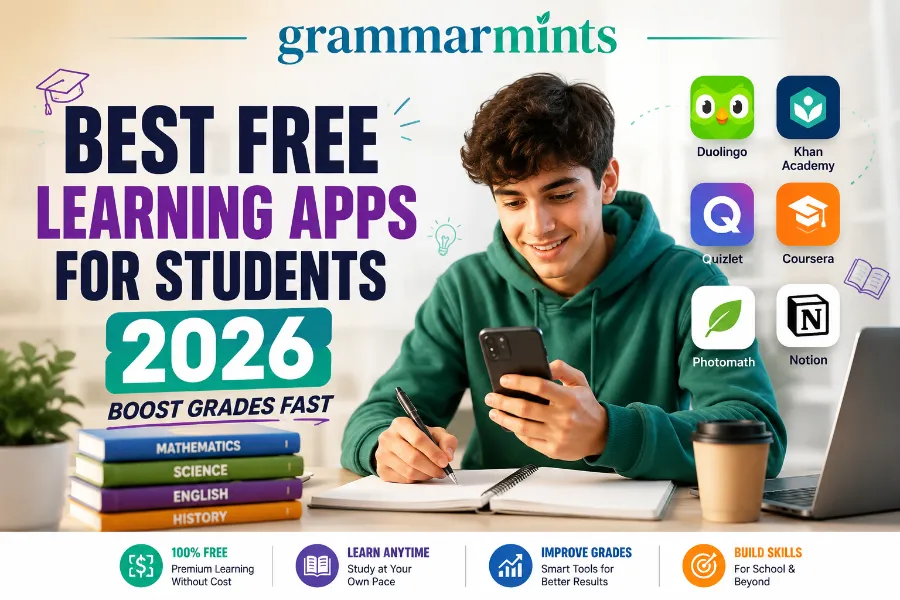
It’s 10 p.m., your assignment is due tomorrow, and your textbook is still closed. Sound familiar? This is exactly why the search for the best free learning apps for students 2026 has exploded this year. Students don’t want another app that looks nice for a week before they delete it. They want tools that genuinely help them remember more, focus longer, and stress less.
This guide skips the fluff. Below, you’ll find real, tested apps that cost nothing to start, plus honest notes on where each one falls short. We’ll also show you how to combine a few of them into a simple daily study system that actually sticks, along with what to check on the privacy front before handing over your email address.
Whether you’re a first-year university student in Boston juggling three lecture halls, a sixth-former in London prepping for A-Levels, or a parent in Berlin trying to help a middle-schooler catch up in math, the apps below fit a budget that’s already tight.
Why Free Learning Apps Matter More in 2026
Tuition costs keep rising across the United States and Europe, and many students simply can’t add another paid subscription to their budget. That’s where free learning apps step in.
A good free app removes the cost barrier that used to limit access to quality tutoring, practice questions, and study organization. It also puts control back in the student’s hands, so a night owl studying at midnight gets the same quality lesson as someone with a private tutor.
This shift isn’t just about saving money, either. A student who can access a full lesson library, flashcard system, and organizational workspace without paying a cent also gets to experiment. They can try a language app for two weeks and drop it without losing a subscription fee, or test three different flashcard tools before settling on the one that actually fits how their brain works. That flexibility rarely existed a decade ago, when most serious study software sat behind a school license or a family credit card.
Three shifts have changed what “free” actually means in 2026:
- AI personalization now adjusts lesson difficulty and pacing to each learner automatically, instead of showing everyone the same content.
- Freemium tiers have gotten genuinely useful, not just a 30-second teaser before a paywall.
- Cross-device syncing means a student can start a lesson on a phone during a bus ride and finish it on a laptop that evening.
How We Picked the Best Free Learning Apps for Students 2026
Not every app that calls itself “free” deserves a spot on this list. We filtered these picks using four criteria:
- The core features must be usable for weeks or months, not just a single free trial.
- The app must still be actively maintained and updated in 2026.
- Ads or paywalls should not block the actual learning experience.
- The tool must fit real student routines — school, part-time work, and everything in between.
Apps with excessive ads, outdated content, or thin free tiers didn’t make the cut.
We also leaned on a simple rule borrowed from EdTech research: a tool only earns a spot on a “best free” list if a motivated learner could realistically use it for weeks or months without hitting a paywall wall. A slick app that turns unusable after day three doesn’t help anyone, no matter how good its marketing looks. <!– CHART: free-learning-apps-2026-chart.png .
Show Image
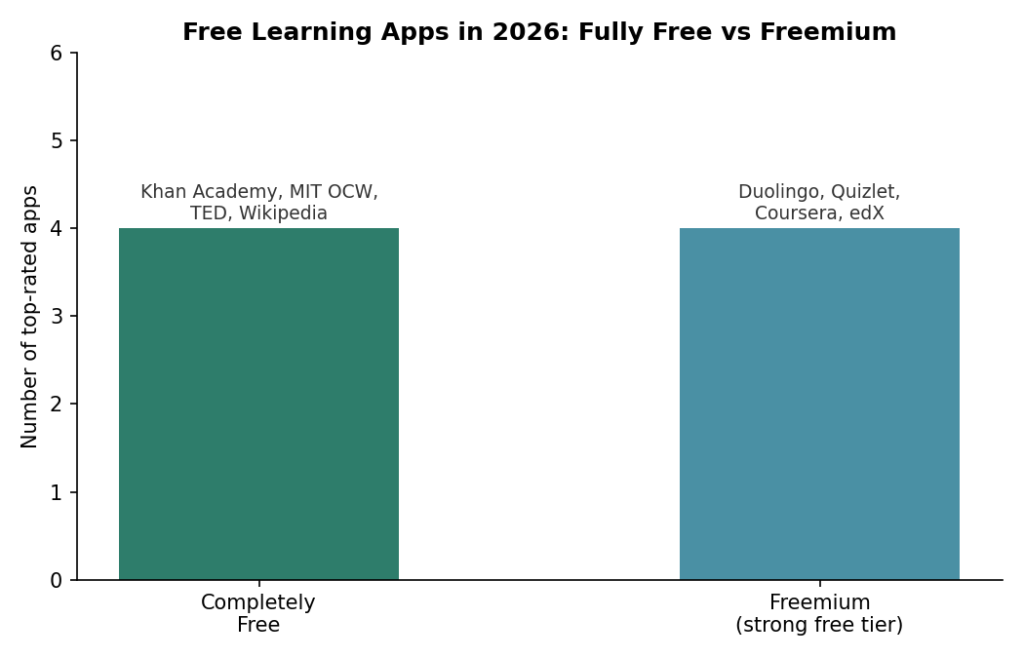
As the chart above shows, the current crop of top-rated free learning apps splits almost evenly between tools that are entirely free with no paid tier at all, and freemium tools whose free version is still generous enough to build a real study habit around. That split matters because it means a student on a tight budget in Chicago, London, or Berlin can build a complete study system without spending a cent, as long as they pick the right combination.
Best Free Apps for Core Subjects: Khan Academy and MIT OpenCourseWare
Khan Academy is still the gold standard for free academic learning. Sal Khan originally built it to tutor his cousins remotely, and it has since grown into a full K-12 and early college library covering math, science, economics, and test prep. The College Board helped Khan Academy build its SAT prep course, so students get official-style practice at no cost. Every lesson stays completely free, with no hidden subscription tier.
MIT OpenCourseWare works differently. Instead of guided lessons, it publishes real MIT course materials for free, which suits a student who wants to go deeper into one subject rather than follow a structured path. A college student stuck on a hard class can pull up a differently-taught version of the same material from another top institution entirely.
Quick tip: If you’re prepping for the SAT or a tough math class, start with Khan Academy’s practice sets before touching MIT OCW’s denser course notes.
Best Free Apps for University-Level Courses: Coursera and edX
Coursera and edX both let students audit full university courses at no cost, and you only pay if you want a graded assignment record or an official certificate tied to your name. Harvard and MIT founded edX before dozens of other universities joined in, which means the breadth of subject matter available for free is hard to match anywhere else online.
This matters most for two kinds of students. First, a college student stuck in a difficult class can supplement it with a differently-taught version of the same material from another institution entirely. Second, a high schooler unsure whether to major in psychology, computer science, or economics can audit a real university-level course before committing a semester and a tuition bill to that decision. Course quality does vary by instructor, though, so it’s worth skimming a few reviews before diving into a multi-week course — WordlyCove’s roundup of 20 free education apps is a solid place to cross-check reviews for lesser-known university-audit platforms before you commit your evenings to one.
Best Free App for STEM Curiosity: NASA App
Not every learning app needs to feel like homework. The official NASA app gives students access to real-world science data and live mission tracking, including current lunar missions, along with thousands of high-resolution images and live NASA TV streaming. Its augmented reality mode even lets students place a virtual rover or rocket in their own room, which turns a dry astronomy chapter into something they can actually see in front of them.
It’s completely free, ad-free, and holds a strong 4.8 rating with more than 10 million installs, making it a genuinely authoritative resource for research projects and general STEM inspiration rather than just a novelty.
Best Free Apps for Language Learning: Duolingo and Memrise
Duolingo remains the most popular language app worldwide, and its free tier now covers all 40-plus languages with complete lesson paths. The app leans on daily streaks and small games to make fifteen minutes of practice feel less like homework. Its paid Super plan removes ads and adds AI conversation practice, but the core language path stays free.
Memrise takes a different route, using visual mnemonics and spaced repetition to help vocabulary stick. It pairs well with Duolingo: use Duolingo for daily structure, and Memrise when you need to drill stubborn vocabulary that keeps slipping away. If you’re teaching or supporting a younger reader rather than studying yourself, Skolera’s list of free educational apps also covers early-reading tools like Read Along, which uses instant verbal and visual cues to help students as young as five build reading confidence.
Best Free Apps for Flashcards and Memory: Quizlet, Anki, and FlashRecall
Flashcards are still one of the fastest ways to prep for a quiz, and three apps stand out here for different reasons.
- Quizlet lets you build flashcards from your own notes or search ready-made sets, and its “automatic definition” feature speeds up card creation. The free tier includes ads, and true spaced repetition sits behind a premium plan.
- Anki is the strongest spaced-repetition engine available, and it’s completely free on desktop and Android (the iPhone version carries a one-time cost).
- FlashRecall takes a more modern approach for iPhone users: it turns your notes, PDFs, screenshots, or even YouTube videos into flashcards automatically, then schedules reviews using spaced repetition. For students who dread manually typing out cards, FlashRecall’s free-to-start plan is one of the fastest ways to go from a messy set of lecture slides to a working study deck.
Best Free App for Math Help: Photomath
Photomath lets a student point their phone camera at a math problem and get a step-by-step solution instantly. In 2026, its AI has expanded to cover calculus, linear algebra, and statistics, subjects where students previously had to wait for office hours to get real help. Because the explanations walk through each step rather than just showing a final number, students can actually study the logic instead of only copying an answer.
That said, this is one app worth using with a little discipline. Use it to check your work, not to skip the thinking — leaning on it too heavily before a closed-book test can leave you unable to reproduce the same steps without your phone in hand. Treat it as a tutor that shows its work, not a shortcut around learning the method.
Best Free Apps for Organization and Writing: Notion
Notion’s free plan gives students pages and blocks flexible enough to build a full study dashboard: assignment due dates, class notes, and exam topics all in one place. A common setup is a single dashboard with progress bars for each subject, which keeps a long syllabus from feeling overwhelming. Students studying for professional certifications have described building a dashboard where they can see exactly how much of the syllabus they’ve covered at a glance, which keeps motivation steady even during a multi-month exam prep cycle.
Once you organize your notes and schedule in Notion, the next step is polishing the essays and reports you write from those notes before submission. That’s a separate skill from studying, and it’s worth pairing with a dedicated proofreading tool. Our Grammarly vs ChatGPT comparison breaks down which tool to reach for when you’re drafting a paper from scratch versus tightening up a draft you’ve already finished, which matters if you’re combining a free research tool with a free editing tool in the same evening.
For students still developing their writing process, browsing GrammarMints’ full library of study and writing guides is a useful next stop after you finish this list, since planning tools and writing tools tend to work best when they’re chosen together rather than one at a time.
Best Free Apps for Group Learning and Quizzes: Kahoot and Google Classroom
Kahoot turns review sessions into a live, game-show-style quiz that a whole class or study group can join from their own phones, which makes group revision sessions before an exam feel far less tedious than passing around a stack of index cards. Google Classroom, meanwhile, handles the less exciting but equally important side of school life: assignment submission, deadline tracking, and teacher feedback, all inside one free account that most schools already use.
Neither app replaces deep individual study, but both remove friction from the parts of school that have nothing to do with actual learning and everything to do with logistics.
Best Free App for Focus: Forest
Forest gamifies focus sessions by growing a virtual tree while you stay off your phone; leaving the app early kills the tree. It’s a small trick, but pairing it with a flashcard app for review and a writing tool for assignments creates a simple three-part loop: focus, learn, polish.
Free vs Paid: What You Actually Get in 2026
| App | Free Tier Includes | Paid Plan Starts At | Best For |
|---|---|---|---|
| Khan Academy | Full K-12 curriculum, SAT prep, progress tracking | Free — no paid tier | Core subjects & test prep |
| Duolingo | All 40+ languages, complete lesson paths | ~$120/year (family plan, ad-free + AI chat) | Daily language practice |
| Quizlet | Flashcards, basic study modes (with ads) | ~€6.99/month | Quick flashcard sets |
| Anki | Full spaced-repetition engine (desktop/Android) | ~$25 one-time (iOS only) | Long-term memory retention |
| FlashRecall | AI flashcards from notes, PDFs, and video (signup required) | Optional paid tier | Turning messy notes into cards fast |
| Coursera / edX | Free auditing of full university courses | Paid certificate add-on | Exploring a subject before committing |
| Notion | Full personal workspace | Free for personal use | Study planning & organization |
Pricing reflects 2026 figures and can change, so double-check current rates before subscribing to anything.
Which App Fits Which Goal?
| If your goal is… | Start with | Why |
|---|---|---|
| Passing a specific class | Khan Academy | Structured lessons matched to K-12 and early college curricula |
| Learning a language before travel | Duolingo | Daily streaks build a habit fast, and the full path is free |
| Cramming for a quiz this week | Quizlet | Fastest flashcard creation from existing notes |
| Long-term retention for a big exam | Anki or FlashRecall | Spaced repetition schedules review automatically |
| Exploring a major before choosing it | Coursera or edX | Free auditing of real university courses |
| Getting organized before finals | Notion | One dashboard for deadlines, notes, and progress |
| Polishing a final draft | A dedicated editing tool | Catches grammar and tone issues writing apps alone can miss |
Real Student Results: Does This Actually Move the Needle?
Numbers help more than promises. In one case shared by a study-combo reviewer in early 2026, a student preparing for a competitive medical entrance exam paired Khan Academy for concept-building with Quizlet for rapid revision and reported a 60-point score improvement in two months. That’s not magic — it’s consistent daily use of two free tools instead of one.
Separately, a 2026 workflow analysis of writing-focused students found that combining a drafting tool with an editing tool correlated with a 75% jump in both output speed and content quality compared to using either tool alone. The lesson repeats across every category on this list: one app rarely does everything, but two or three used together cover most of a student’s real workload.
Students who eventually turn to Khan Academy often tell a similar story: a tuition teacher explained a statistics concept once, and struggling students had no way to hear it a second time. The appeal wasn’t that the app looked flashier — it let a student replay the same explanation five times at 1.5x speed at midnight, with no judgment attached to needing a repeat. That kind of low-pressure repetition is difficult to replicate in a traditional classroom, and it explains why free video-based platforms have kept growing even as AI tutoring tools have entered the market.
How to Combine These Apps for Best Results
Don’t install everything at once. Instead, build a small stack based on your actual bottleneck this term.
- Pick one app for input — Khan Academy or MIT OCW for learning new material.
- Pick one app for memory — Quizlet, Anki, or FlashRecall to turn that material into flashcards you’ll actually review.
- Pick one app for output — Notion to plan your work, and a proofreading tool once you’re writing essays or reports.
- Add a focus app only if distraction is your real problem — Forest works well here, but skip it if focus isn’t your bottleneck.
This mirrors the setup we outline in our best study techniques for students guide, which walks through pairing tools with actual study science rather than guesswork.
Common Mistakes Students Make With Learning Apps
- App-hopping without finishing a habit. Downloading five apps in one week rarely beats sticking with two for a full month.
- Treating Photomath as an answer key. Reading the steps matters more than copying the final number.
- Ignoring free auditing options on Coursera and edX. Many students pay for a certificate they never needed, just to access course content they could have audited for free the whole time.
- Skipping spaced repetition. Standard flashcard review without spacing wastes time; apps like Anki and FlashRecall handle the scheduling for you automatically.
- Never checking pricing pages after signing up. Free tiers change, and a feature that was free last term can move behind a paywall the next; it only takes a minute to confirm current pricing before you build a habit around a specific app.
- Using five apps for the same job. Two flashcard apps and three note-taking apps rarely add value; consolidating around one tool per task keeps a study routine simple enough to actually stick with past the first week.
If note-taking is where your system breaks down before it even reaches the flashcard stage, our best note-taking methods for students guide covers formats that make the flashcard step much faster later. And if writing itself, not studying, is the bottleneck, our guide on ChatGPT prompts for studying walks through prompts that speed up research and outlining without replacing your own thinking.
Privacy and Data: What Students and Parents Should Check First
Before installing any app, it’s worth spending two minutes on its privacy page, especially for students under 18. Apps for younger learners, such as Khan Academy Kids, generally follow recognized frameworks like the Common Core and early learning standards, and they tend to state clearly that they don’t sell student data.
For students and parents in the European Union, GDPR gives you the right to request what data an app has collected and to ask the company to delete it. In the United States, laws like COPPA apply specifically to apps aimed at children under 13, which is why most major education apps ask for a parent’s email during signup for younger users.
A few quick checks before committing to any app long-term:
- Does the app clearly state whether it sells or shares data with advertisers?
- Can you export or delete your account data if you switch tools later?
- Does the free tier require a credit card upfront, or just an email address?
None of the apps in this guide require payment information to access their core free features, which is one more reason they made the list.
Best Free Learning Apps by Grade Level
Not every app fits every age group, so here’s a quick way to narrow the list down by where a student currently stands:
- Elementary school: Khan Academy Kids and the NASA app work well for building curiosity without overwhelming a younger learner with text-heavy interfaces.
- Middle and high school: Khan Academy, Duolingo, Quizlet, Photomath, and Kahoot cover the bulk of core subjects, language requirements, and quiz-based revision.
- College and university: Notion, Anki, FlashRecall, Coursera, and edX handle the heavier note volume, longer reading lists, and self-directed study that college demands.
- Adult learners returning to study: Coursera, edX, and MIT OpenCourseWare offer the flexibility to study around a job, without the pressure of a graded classroom setting.
Frequently Asked Questions
Choosing the Right App
Which is the single best free learning app for students in 2026? There isn’t one universal winner. Khan Academy is the strongest pick for core academic subjects, Duolingo leads for languages, and FlashRecall or Anki lead for memory and flashcards, depending on which platform you use.
Are these apps really free, or is it a trial disguised as free? Khan Academy, MIT OpenCourseWare, TED, and Wikipedia are completely free with no paid tier at all. Others, like Duolingo, Quizlet, and FlashRecall, are freemium: the core experience is free, and optional upgrades add extras like ad removal or AI conversation practice.
Can I use these apps instead of a tutor? For most core subjects, yes, especially with Khan Academy’s adaptive practice. For highly specific coursework or exam strategy, a tutor still adds value an app can’t fully replace.
Do these apps work for college students, or just K-12? Most of them scale up. Khan Academy covers early college math and economics, Coursera and edX are built around university-level courses, and students use Notion, Anki, and FlashRecall heavily in college specifically because these tools adapt to any subject.
Using These Apps Day to Day
How much time per day should I spend on these apps? Even 20 to 30 minutes of focused daily use — one input session plus one flashcard review — tends to outperform a single long weekend cram session, since spaced repetition works best in short, spaced-out bursts rather than one long sitting.
Do I need Wi-Fi for these apps to work? Most, including Khan Academy, Duolingo, and Anki, offer offline access to previously downloaded lessons or decks, which makes them usable during a commute or in a low-signal dorm room. Coursera and edX video lectures typically need an internet connection unless you download them ahead of time.
Will these apps still be free next year? Free tiers can and do change, so it’s worth revisiting pricing pages once or twice a year. Apps like Khan Academy and MIT OpenCourseWare have stayed free for over a decade because they run as nonprofits, while venture-backed apps are more likely to adjust their free tier as their business model evolves.
Conclusion
The best free learning apps for students 2026 aren’t the flashiest ones on social media. They’re the quiet, consistent tools that fit into a real schedule between classes, part-time work, and everything else on a student’s plate. Start small: pick one app to learn new material, one to remember it, and one to organize your output. Build that habit for a month before adding anything else, and you’ll likely see the same kind of steady improvement students across the U.S. and Europe are already reporting this year.
None of these tools require a leap of faith or a credit card upfront, so the easiest next step is simply to open one app tonight, set a ten-minute timer, and see how it fits before deciding what to add next.
References
- Khan Academy Kids, “Free Learning App for Kids Ages 2-8” — https://www.khanacademy.org/kids
- WordlyCove, “20 Best Free Education Apps for Students in 2026” — https://wordlycove.com/education-apps-for-students/
- FlashRecall Blog, “Best Free Learning Apps for Students (2026): Top Picks” — https://flashrecall.app/blog/best-learning-apps-for-students-free
- Skolera, “15 Free Educational Apps for Students 2026” — https://skolera.com/en/blog/free-educational-apps-for-students/
- Create & Learn, “16 Top Education Apps for Kids 2026” — https://www.create-learn.us/blog/top-education-apps/